
Олександр Сич
28 June 2026
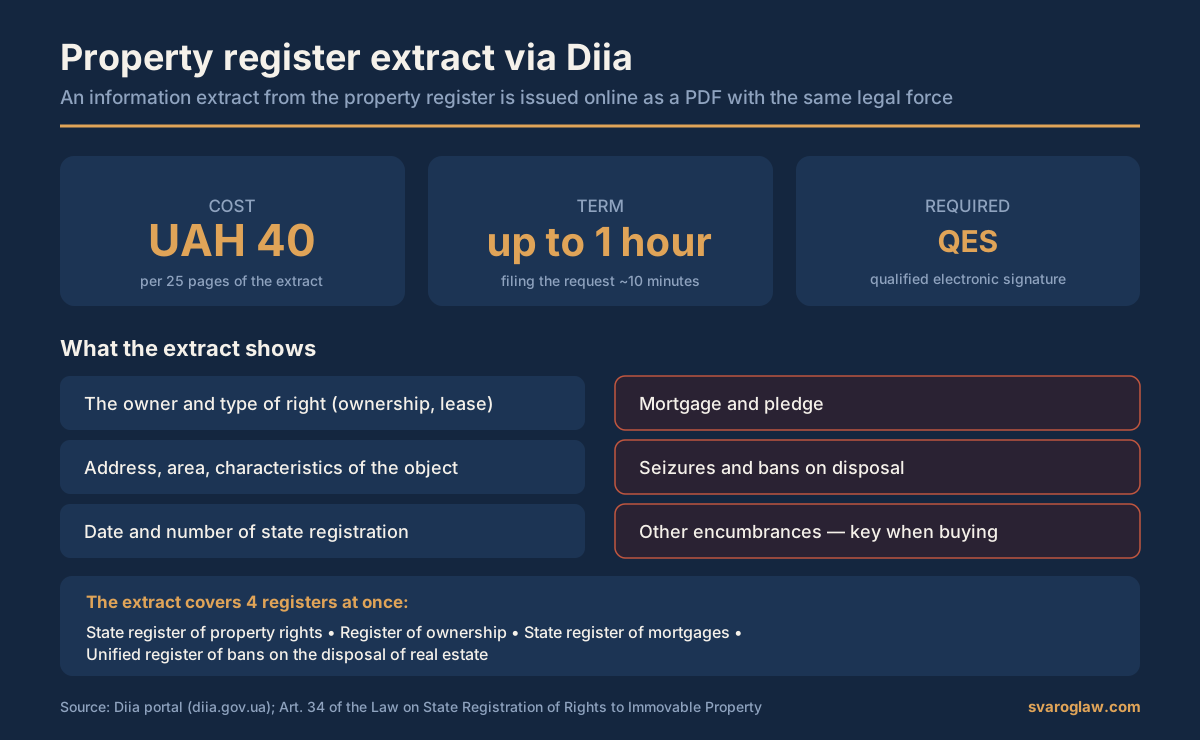
The Diia portal issues an information certificate from the State Register of Real Property Rights as a PDF. In 2026 it costs 40 UAH for every 25 pages (0.0125 of the subsistence minimum), is produced within an hour, and requires a qualified electronic signature to order. A paper certificate through an administrative service centre costs 80 UAH.
The charge for a certificate from the property register is tied to the subsistence minimum for working-age people, which from 1 January 2026 is 3,328 UAH. Hence this year’s figures: 40 UAH for an electronic certificate, 80 UAH for a paper one and 130 UAH for a notary’s or lawyer’s direct access to the register. It is the cheapest part of any property transaction and, at the same time, the part where people most often save time and later lose money.
Below: what the document is, how it differs from a classic extract, how to order it step by step, what restrictions on disclosure appeared at the end of 2025, and what to do if the property is not in the register at all.
What an extract from the property register is
An information certificate from the State Register of Real Property Rights is an official document showing the owner, the type of registered right (ownership, lease, mortgage, trust ownership), the date and number of state registration, the characteristics of the property, and any encumbrances, prohibitions on disposal and attachments. The certificate obtained through Diia as a PDF has the same legal force as a paper document and is accepted by notaries, banks and public authorities.
The terminology matters too. Through Diia the user orders an information certificate from the register themselves. A classic extract, in the sense the law uses, is produced by a state registrar or notary as the result of a registration action — after registering a transfer of ownership, for instance. For most everyday situations, where you need to check a property before buying or make sure there are no attachments, the Diia certificate is entirely sufficient.
What an extract from the property register costs in 2026
The charge is set by Article 34 of the Law “On State Registration of Real Property Rights and Their Encumbrances”. The rates are expressed as fractions of the subsistence minimum for working-age people as at 1 January of the year of filing, and are rounded to the nearest 10 hryvnia.
| How it is obtained | Rate | Amount in 2026 |
|---|---|---|
| Electronic certificate through Diia | 0.0125 of the minimum per 25 pages | 40 UAH |
| Paper certificate through a service centre or registrar | 0.025 of the minimum per 25 pages | 80 UAH |
| A notary’s or lawyer’s direct access to the register | 0.04 of the minimum | 130 UAH |
| State registration of ownership (5 working days) | 0.1 of the minimum | 330 UAH |
| Registration of other real property rights | 0.05 of the minimum | 170 UAH |
The exact amount is shown as you complete the request and can rise where the certificate runs long: the charge applies to every 25 pages of information. That happens most often when you ask for details of every property registered to one person. The law provides no exemptions from the charge for supplying information, unlike the administrative fee for registration actions, from which people with group I and II disabilities, combat veterans and citizens whose homes were destroyed in the fighting are exempt.
What changed in the certificates: restrictions from 27 December 2025
By Resolution No. 1737 of 24 December 2025 the Cabinet of Ministers limited what goes into an electronic certificate from the register. Since 27 December 2025 the electronic form does not show the exact location of properties belonging to legal entities (only the country and region are visible), nor the cadastral numbers of the land beneath them. The restriction runs for the duration of martial law and one year after it ends or is lifted; banks that have signed a service agreement with the register’s technical administrator receive the information in full.
For an ordinary check on a flat owned by an individual, none of this changes anything. But if you are checking a company’s property before a corporate transaction, the Diia certificate may no longer be enough and the information will have to be ordered through a notary or a lawyer with direct access to the register.
Separately, from 1 January 2026 the Cabinet of Ministers’ Resolution No. 1534 of 26 November 2025 applies: the state registrar may now stay an application, and the list of decisions open to administrative challenge has grown — automatic actions of the register’s software and notices of unauthorised use of access identifiers can now be challenged too.
When you need an extract
The document is needed when buying or selling a flat, a house or a plot of land, when dealing with an inheritance, when making a deed of gift, when taking a loan secured on property, when dividing spouses’ property, and in court disputes over ownership. The most important use is the pre-purchase check: it is the register certificate that reveals a hidden attachment, mortgage or tax lien the seller may forget to mention.
Before signing the sale contract it is worth ordering the certificate twice: a week before the deal, so there is time to look into anything it turns up, and on the day of signing, since an encumbrance can appear overnight.
Step by step
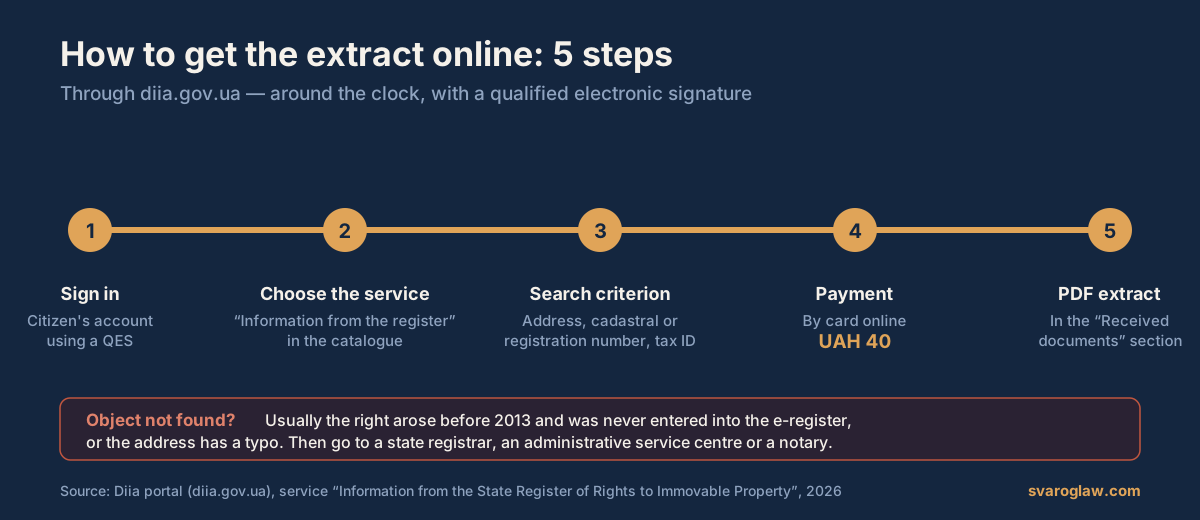
- Sign in. Enter the citizen’s account at diia.gov.ua using a qualified electronic signature. This service needs that signature specifically, not just BankID.
- Choose the service. Find “Provision of information from the State Register of Real Property Rights” in the catalogue.
- Set the search criterion. A property is searched by address, by the plot’s cadastral number, by the property’s registration number or by the owner’s details (tax number or passport data). The more precise the address, the more precise the result.
- Pay the 40 UAH. Once the data is checked the system offers online card payment. If the certificate runs past 25 pages, the amount rises in multiples.
- Collect the certificate. The PDF is produced within an hour (usually in about ten minutes) and appears under “Services” — “Documents received”. The file can be saved or printed, and its authenticity checked by registration number on the Ministry of Justice portal.
How to read the certificate before buying
Getting the file is half the job, because the risk usually hides in the second half of the document. What to look at, in order:
- The ownership section. Check the owner’s surname and tax number against the seller’s passport. Where there are several owners, each must consent to the sale, and where spouses hold jointly, the other spouse’s notarised consent is required.
- The basis on which the right was acquired. A certificate of inheritance obtained less than three years ago means a heightened risk that an heir who missed the deadline will surface.
- The encumbrances section. This shows mortgages, tax liens, attachments under a court order or a bailiff’s decision, and prohibitions on disposal. Any entry here stops the transaction until it is lifted.
- The date and number of the entry. A fresh change-of-owner entry a few weeks before the sale is a reason to check the chain of title.
- The land details. For a house, check whether the right to the plot beneath it is registered and whether the cadastral number matches the documents.
Why a property may not show up
Sometimes a search finds nothing. The commonest reasons:
- ownership was registered before 1 January 2013, that is before the electronic register existed, and the data has not yet been transferred from the inventory bureau’s archives;
- a mistake in entering the address or the cadastral number;
- ownership was never properly registered;
- the criterion used found another person’s property with matching details, so it is worth searching by tax number instead.
If a property was registered before 2013 and is missing from the register, that does not mean ownership has been lost: the data must be entered through a state registrar, a service centre or a notary, on the basis of the title document and an inventory bureau certificate. Registering ownership costs 330 UAH on the standard term of up to five working days.
What to do if the certificate is wrong
First check that you entered the search criteria correctly, then apply to the state registrar to correct a technical error — correction is free where the registrar made the mistake. Where the entry affects your ownership (another owner has appeared, say, or an encumbrance you never granted), there are two routes: an administrative challenge to the Ministry of Justice under the procedure updated from 1 January 2026, or a court claim to cancel the state registration. The deadlines are short, and court representation in cancellation cases needs documents gathered in advance.
When you do not need a lawyer
Ordering a certificate for yourself needs no help: five steps, 40 UAH and an hour. Checking a flat before renting it, or verifying the data on your own property, is just as straightforward.
A specialist becomes useful when the certificate shows something — or, just as tellingly, shows nothing. That covers cases where your property is missing from the register, where a dispute over ownership has arisen, where an unlawful encumbrance or attachment has surfaced, where an improper state registration must be cancelled or documents restored. There a lawyer will establish the cause, prepare the application to the registrar or the ministry and, if needed, represent you in court. Indicative prices are on the service costs page.
Questions and answers
What does an extract from the property register through Diia cost in 2026?
40 UAH for the electronic certificate per 25 pages. A paper one through a service centre costs 80 UAH, and a notary’s or lawyer’s access to the register 130 UAH.
Does the electronic certificate have legal force?
Yes. It is generated directly from the State Register of Real Property Rights and is accepted by notaries, banks and public authorities on the same footing as a paper document.
How long does it take?
Submitting the request takes about ten minutes; the document is produced within an hour of payment, usually sooner.
Can I get the certificate without visiting a service centre?
Yes, entirely online through the Diia portal. You need a qualified electronic signature; BankID alone is not enough for this service.
Can I get a certificate about someone else’s property?
Yes, the register’s information is public, and the search parameters take the person’s or the property’s details. That is exactly what makes a pre-purchase check possible.
Why does the certificate not show a company’s property address?
Since 27 December 2025 Cabinet Resolution No. 1737 has limited the display of the exact location of legal entities’ properties and of cadastral numbers in electronic certificates. The restriction lasts for the duration of martial law and a year afterwards.
What if the property does not appear in the register?
Most often that means the right arose before 2013 and was never entered in the electronic register. Apply to a state registrar, a service centre or a notary to have the data entered on the basis of the title document.
How does a Diia certificate differ from an extract?
Through Diia you order an information certificate yourself. A classic extract is produced by a registrar or notary as the result of a registration action. For checking a property, the Diia certificate is usually enough.
How long is a certificate from the property register valid?
The law sets no validity period: the certificate reflects the state of the register at the moment it was produced. In practice notaries and banks accept a document generated on the day of the transaction or a few days before.
Sources
- Law of Ukraine “On State Registration of Real Property Rights and Their Encumbrances” No. 1952-IV, Art. 34 — zakon.rada.gov.ua
- Cabinet of Ministers Resolution No. 1127 of 25.12.2015 “On State Registration of Real Property Rights and Their Encumbrances” — zakon.rada.gov.ua
- Cabinet of Ministers Resolution No. 1737 of 24.12.2025 — restriction of data in electronic certificates (in force from 27.12.2025) — zakon.rada.gov.ua
- Cabinet of Ministers Resolution No. 1534 of 26.11.2025 — changes to the registration procedure from 01.01.2026 — zakon.rada.gov.ua
- The service “Information from the State Register of Real Property Rights” — diia.gov.ua
- Ministry of Justice of Ukraine: guidance on obtaining information from the register — minjust.gov.ua
Help with property questions from Svarog
If the check has revealed a problem — an attachment, an unlawful encumbrance, no entry for your property or an error in the register — Svarog’s lawyers will establish the cause, prepare the application to the registrar and, if needed, defend your ownership in court. More on the page of our property lawyer.
+38 095 554-54-24 · Kyiv, 7 Khoriva Street (Podil) · Mon–Fri 9.00–18.00